New in the shop · SAP ECC and S/4HANA

eInvoice Viewer for SAP: read e-invoices in the SAP GUI and check them against your master data

Read incoming and outgoing e-invoices directly in FB03, MIR4 and VF03: XRechnung, ZUGFeRD and Peppol. The edition with checks also checks every invoice against your SAP master data, for example bank details, duplicate invoice numbers and the purchase order. No server and no cloud, installed in five minutes.

At a glance

Price: €799, with checks €1,199, one-off per SAP system plus VAT, with updates

Purchase: here in the shop, download in your customer account

Manual: German and English

Setup: on request at a fixed price of €600

Requirement: SAP GUI from 7.70 with the Edge control


Pilot programme

Pilot customers wanted: eInvoice Posting for SAP and VAMPIRE ABAP

Two more SAP products are built and go to pilot customers first: eInvoice Posting for SAP posts e-invoices without retyping, VAMPIRE ABAP validates e-invoices in SAP against the official rules, without Java and without a cloud. There are three pilot places for each of the two products.

What you get

You pay half the purchase price: €995 instead of €1,990 for eInvoice Posting for SAP, €745 instead of €1,490 for VAMPIRE ABAP, each one-off per SAP system plus VAT. The setup is charged at the full fixed price.

What you contribute

You provide a test system with financial accounting and an archive, give feedback within four weeks of the setup and allow us to name your company as a reference.

How to apply: in the contact form, under “What is it about?”, choose the product marked “(pilot customer)”. You will then receive a written pilot agreement.


Outgoing invoices · SAP ECC from 7.4 and S/4HANA · Processing in-house

E-invoices from SAP ECC and S/4HANA: created, validated and sent within your own company

With this approach you create e-invoices directly from posted documents in SAP ECC or SAP S/4HANA. An e-invoice is an invoice as a structured file that a program can read, for example an XRechnung or a ZUGFeRD file. The add-on in SAP reads the document data, a processing server in your network builds the invoice from it, validates it with the official KoSIT validator and passes it on to the recipient.

At a glance

Three things set the approach apart. Everything runs on your side, and no invoice record goes to an outside service. The SAP part is published as open source, so your Basis team can read every line. And eleven document types, from sales to rebate settlement, are already mapped.


11

Document types are already mapped, from SD billing to supplier settlement from Settlement Management.

0

Raw data records leave your company. Only the finished invoice goes out, to its recipient.

2

Stages share the work: SAP decides and reads, the server in your network translates, validates and sends.

11

own tables are brought along by the add-on in SAP. It needs no modification and no user exit.


From 2027, larger companies must issue e-invoices. Your SAP should not have to be rebuilt for that.

From 2027, companies in Germany with more than 800,000 euros in prior-year turnover must issue their invoices to other businesses as e-invoices, and from 2028 essentially all companies. Many SAP customers still work with SAP ECC or with S/4HANA in their own data centre, and SAP’s own solutions usually require a newer release or a cloud service.

The obvious ways out each have a catch. An external service receives names, addresses, bank details and prices from your system, and many companies may not or will not allow that. A custom development in ABAP has to be adapted every year to new format versions and validation rules, and it depends on the few colleagues who understand it.

On top of that comes the variety of documents: sales invoices, credit notes in the self-billing procedure, consignment settlements, rebate settlements. Each document type has its own tables and special cases.


How the e-invoice is created from SAP: two stages, both in your company

The approach splits the work where things change. SAP knows where the data is and who the invoice goes to. The processing server knows what an e-invoice must look like. The two are connected by the mapping, a file that tells SAP what to read and the server what to calculate from it.

Stage 1: the add-on in SAP

A background job finds every newly posted document. The add-on selects the matching mapping and the recipient, reads exactly the fields the mapping names, and later stores the result in the archive with the document. It only changes when SAP changes.

Stage 2: the processing server

A Java program on a server in your network translates the SAP values into the fields of the EN 16931 standard, generates the target format, validates it with the official KoSIT validator, creates the PDF and delivers the invoice. New format versions only affect this stage.


Your first e-invoice in three steps

1. Set up the add-on and server

The Basis team imports the add-on via abapGit or a transport and sets up the connection to the server in SM59. The server runs as a container, as a Java service or in a virtual machine in your cloud.

2. Assign mappings and maintain recipients

You assign the ready-made mappings to your company codes and document types and enter defaults for format and delivery channel. Recipients with special requirements, such as a Leitweg-ID, are kept in a separate list.

3. Post as before

From then on, the background job finds every posted document, and the invoice goes out validated. In the cockpit you see for every document what was sent, and anything that did not go through is listed there with the reason.


What makes this approach special

Your invoice data stays in your company

The add-on and the processing server both run in your network. We do not operate a service through which your documents pass. Only the finished, validated invoice goes out, and only to where it goes anyway: to the recipient.

What you gain: The question of data processing on behalf and data transfer to third parties does not arise, and your data protection officer does not have to assess an outside service.

One mapping for two stages, translations only once

The mapping is a file, not a program. What differs from customer to customer, such as which billing type results in which invoice type or which conditions appear on the invoice, is kept in small value tables on the server that all mappings share.

What you gain: A new billing type or a new payment method is an entry in a table, not a development task.

The SAP part is open

The add-on is published as open source under the Apache 2.0 licence. There is no purchase price, and it only reads tables that are listed in an approved mapping.

What you gain: Your Basis team checks every line before it enters the system, and you do not depend on a closed program in your SAP.

No posted document silently slips through

There is no list of “who gets an e-invoice”, only a list of exceptions, each with a reason. Every document ends in a clear state: delivered, excluded or handled manually.

What you gain: You can prove at any time what happened to every invoice, even a year later.


Eleven document types, ready mapped

  • Sales

    SD billing including billing plans, with control of conditions and sub-items.

  • Directly in financial accounting

    Customer invoice from FB70 and credit note to suppliers from FB60.

  • Purchasing and self-billing

    Evaluated receipt settlement, revaluation, invoicing plan, manual credit memo, invoice reduction from MIRO, and consignment and pipeline settlement.

  • Settlement Management

    Settlements to customers and with suppliers, for example from rebate agreements.


The recipient determines the format, not the programmer

Leitweg-ID, Peppol identifier, a different mail recipient, a specific house bank on the invoice or even a custom layout: what an individual recipient requires is an entry in SAP, not a programming task. Defaults apply per company code and sales or purchasing organisation; deviating customers and vendors are kept in a separate list, each with a reason. The business department maintains this list directly in the production system, without waiting for a transport.


Try instead of read: the Mapping Studio in the browser

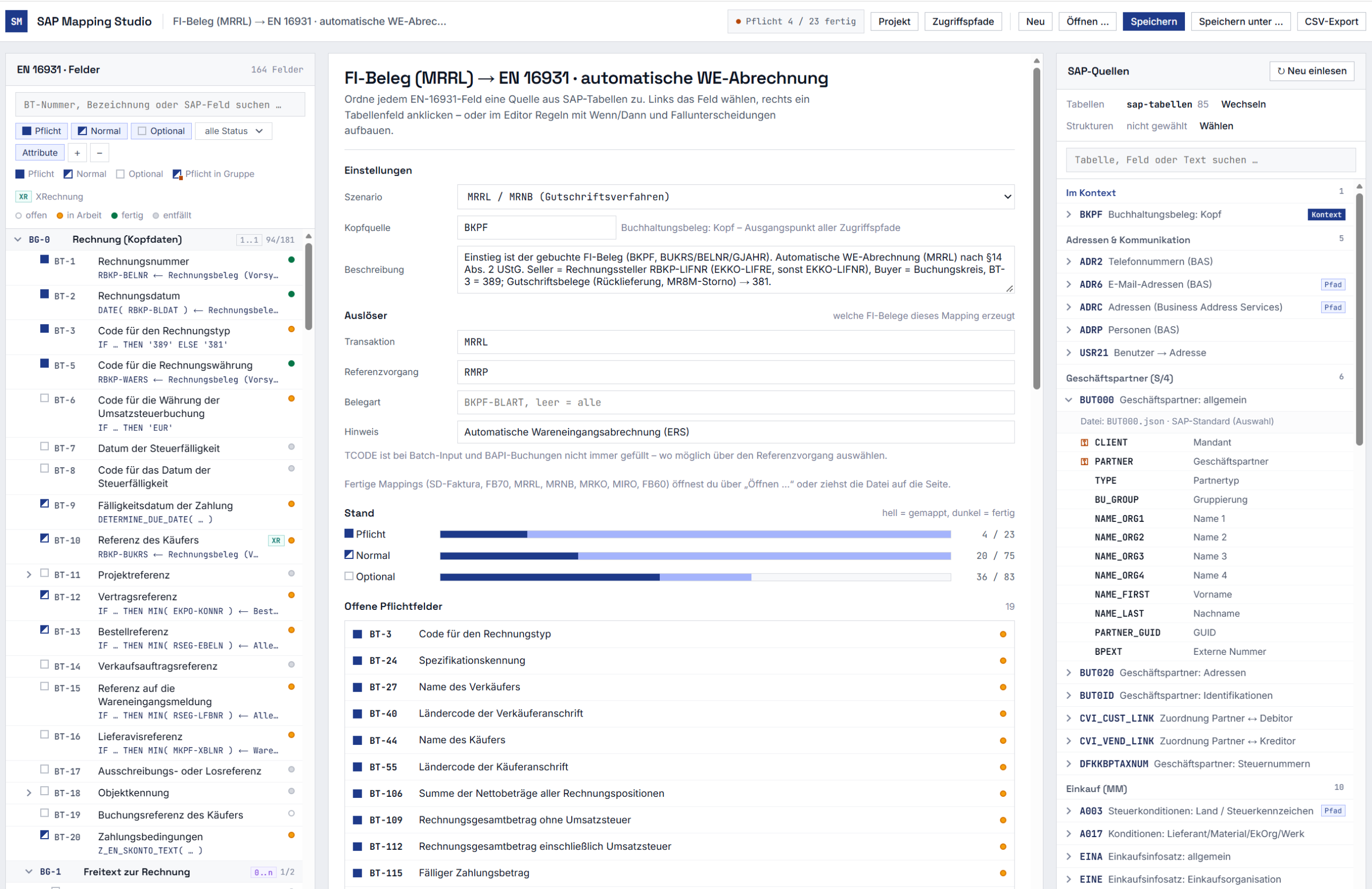
The Mapping Studio. On the left the field catalogue of the standard, in the middle the field being edited, on the right the SAP tables. The demo includes the table library and two ready-made mappings and runs entirely in your browser.


What still goes out, and why

  • The finished invoice to the recipient

    Via Peppol through your provider’s access point or by e-mail through your mail server. Only what the recipient receives anyway goes out.

  • Online validation of identifiers, if you switch it on

    Queries to public services such as VIES for the VAT identification number can be switched off. The formal check continues to work offline.

  • New rule versions, in the opposite direction

    New validation rules and code lists come to you as a package. The server can fetch them itself or you import them; no data flows out in the process.


Questions and answers

Frequently asked questions

Yes. The add-on is written in classic ABAP within the language scope of 7.40 and runs on SAP ECC from release 7.4 as well as on SAP S/4HANA in your own data centre or in the Private Cloud. The mappings know both table worlds. S/4HANA Public Cloud is not possible, because it allows neither custom tables nor free reading of tables.

In your network: as a container, as a Java service on Windows or Linux, in a virtual machine in Azure or AWS that you operate, or in your own SAP BTP account. As a guideline, two processor cores and four gigabytes of memory are enough for several tens of thousands of documents per year.

It stays in your company. The add-on sends the document data only to your own server, and that server only passes the finished invoice on to the recipient. We do not see your data; in case of an error, you decide whether to send us an anonymised diagnostic package.

As a rule package for the server, i.e. a package with the current validation rules, code lists and format versions. SAP is not affected, because the add-on only reads raw data. A switch to XRechnung 4.0 therefore affects the server and the mappings, not your SAP.

Nothing. The SAP part is published as open source under Apache 2.0. What you pay for is the subscription for the processing server, the package with the ready-made mappings and the implementation. All prices are openly listed on the pricing page.

Then it does not go out. The finding is shown in plain language in the cockpit, with the affected field and the rule version it was checked against. After the correction you resend the document with one click.


What does this look like in your system?

Show me a document type from your company, and I will show you what the mapping for it looks like and what needs to run in your network.