eInvoice Viewer for SAP · Available now · SAP ECC and S/4HANA

E-invoices in the SAP GUI read and check

One click in “Services for Object”, and the XRechnung or ZUGFeRD invoice for the document appears in readable form, in the design of your SAP GUI. With the checks, the eInvoice Viewer for SAP validates it against your master data at the same time: own company, bank details, customer or supplier. No server and no cloud, because no document leaves your system.

  • Read-only, no modification

  • One abapGit package, installed and removed in five minutes

  • One-off from €799 per SAP system, updates included

At a glance

Attachments: embedded attachments (BT-125) directly in the window

Formats: XRechnung (UBL and CII), ZUGFeRD/Factur-X as PDF or XML, Peppol BIS

Access: GOS service in FB03, MIR4 and VF03 and report in SA38

Checks (with checks): outgoing, incoming, identifiers

Design: SAP Quartz and SAP Horizon, light and dark

Languages: German and English according to logon language

Requirement: SAP GUI from 7.70 with Edge control

Price: €799, with checks €1,199, one-off per SAP system plus VAT

Available

Available in the shop, with manual

Both editions are available in the shop on einvoice4s.de. After purchase you download the import file for abapGit in your customer account. The Manual describes installation, settings, checks and removal, in German and English. We are happy to answer questions about your system before you buy via the contact form.

The price applies once per SAP system, with updates: €799, with checks €1,199, plus VAT. “Per SAP system” means one production system with its development and test systems. If you do not want to install it yourself, add the setup at a fixed price of €600 for half a day in the shop.


The problem

E-invoices sit in the SAP archive, but nobody can read them

Nobody can read the XML

An XRechnung is a file with hundreds of technical terms. In the attachment list it opens as raw text, and when a customer asks a question, nobody in the company knows exactly what was sent.

The PDF says something else

With ZUGFeRD it is the embedded XML that counts, not the image. Whether the two match cannot be seen in SAP.

The IBAN is new

Fake bank details on genuine invoices are among the most common fraud routes. Nobody checks whether the IBAN belongs to the supplier when opening an invoice.

From 2027, companies with more than €800,000 in prior-year turnover must send e-invoices, from 2028 all of them. With that, these questions arise in accounting every day.


How it works

One document, one click, the invoice readable and checked

  1. 1Open the document

    in FB03, MIR4 or VF03 as usual

  2. 2“Display e-invoice”

    in the “Services for Object” menu, only active if an e-invoice is attached to the document; alternatively in the report in SA38

  3. 3Read and check

    in a separate window above the document, with all fields and, with the checks, the check results


The tabs

What the viewer shows in the SAP GUI

The tabs of the eInvoice Viewer for SAP
TabWhat you see thereWhat you gainEdition
InvoiceAll details of the e-invoice in groups, optionally with the field numbers of the standardYou read the invoice the way your customer or supplier meant itboth
XMLThe original file; for ZUGFeRD the XML read from the PDFFor the business department and for queriesboth
PDFThe visual representation for ZUGFeRDImage and data side by sideboth
AttachmentsAll attachments embedded in the e-invoice (BT-125), such as time sheets, delivery notes or statements as PDF, opened directly in the window and saved if requiredYou see everything that was sent with the invoice, without taking the file apartboth
Outbound CheckOwn company data, own bank details, customer and Leitweg-ID against SAPErrors become visible before sending or when a query comes inwith checks
Inbound CheckRecipient, supplier, IBAN, duplicate invoice number, purchase order and payment terms against SAPA safeguard before the payment runwith checks
Identifier CheckIBAN, BIC, VAT ID and other identifiers checked formallyTypos and invalid identifiers are noticed immediatelywith checks

What it looks like

The eInvoice Viewer in the SAP GUI

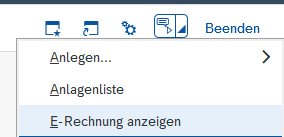
The
One click in “Services for Object”: the entry “Display e-invoice” is below the attachment list and is only active if an e-invoice is attached to the document.
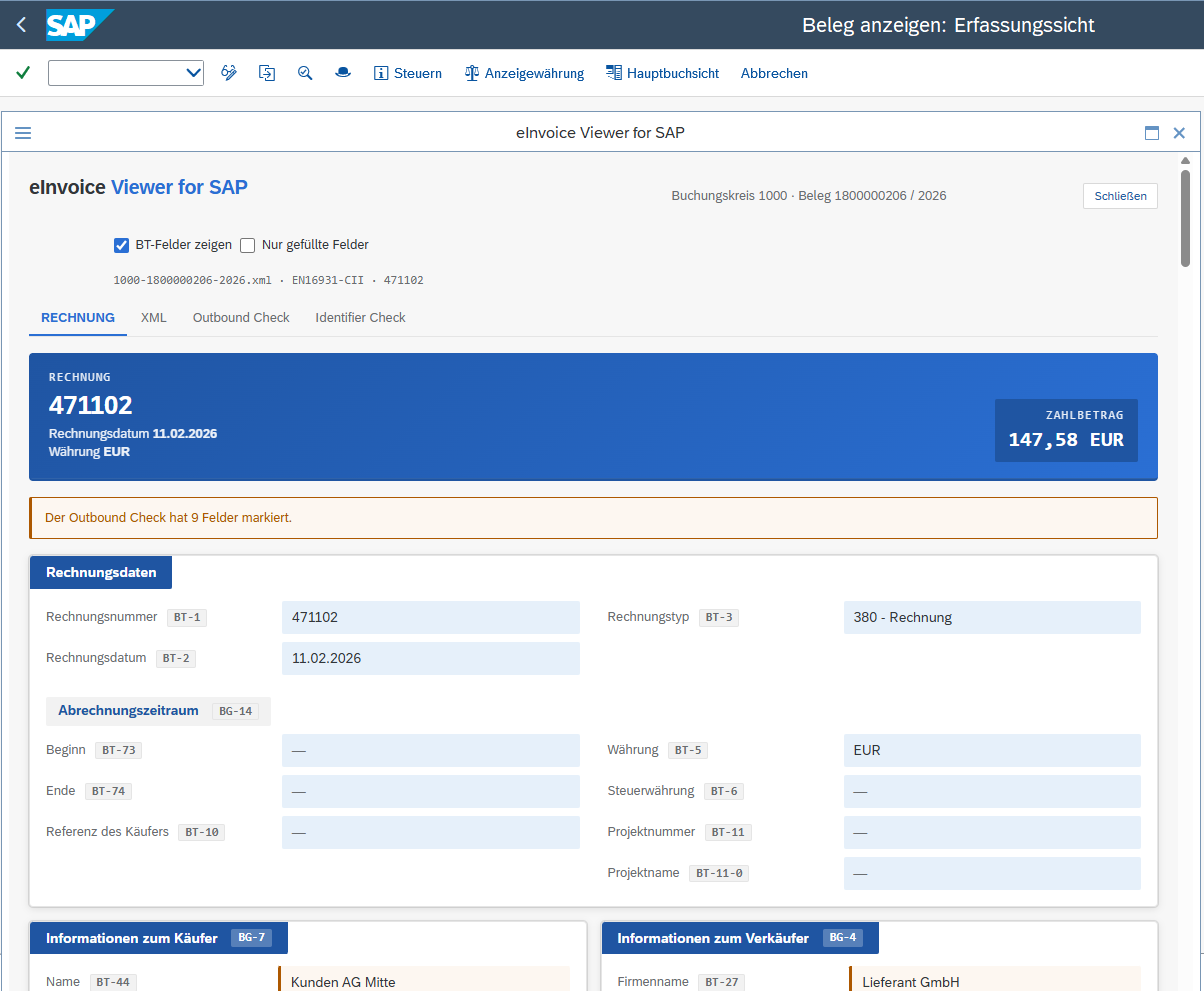
An outgoing invoice from FB03 in the
An outgoing invoice from FB03 in the “Invoice” tab, optionally with the field numbers of EN 16931.
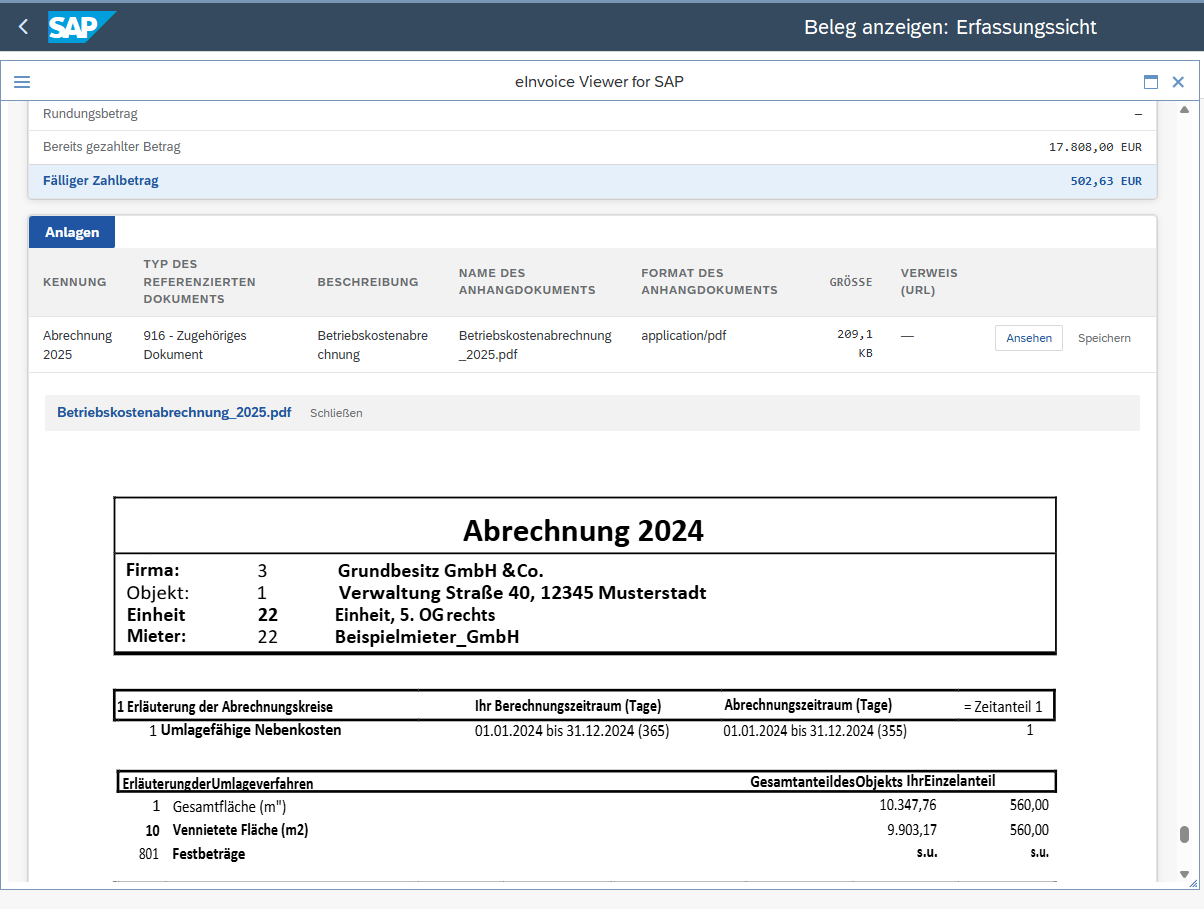
An embedded attachment of the e-invoice, opened as PDF
Embedded attachments: the service charge statement sent with the e-invoice opens as a PDF directly in the window.
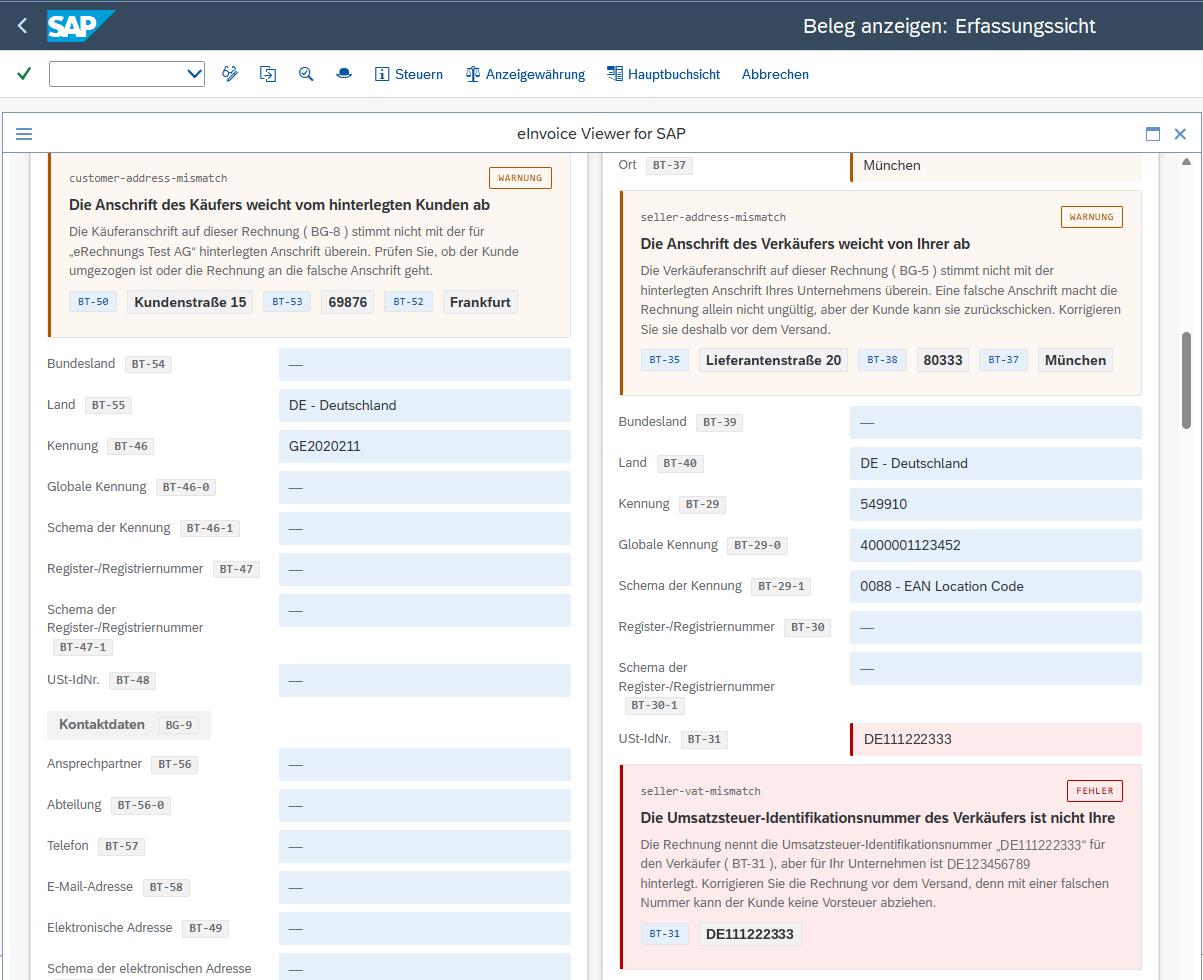
Findings of the Outbound Check: warnings and an error
With checks: the Outbound Check reports deviating addresses as a warning and a foreign VAT ID of the seller as an error.

All images show sample data.


The checks in detail

What the edition with checks validates against SAP

The checks run automatically on opening, matching the direction of the document: for an incoming invoice the Inbound Check, for a billing document the Outbound Check, in both cases the Identifier Check. SAP only supplies the data from company code, vendor or customer; the judgement is made in the viewer, with the same rules as in all delivery forms.

Inbound Check

  • Recipient

    Is the invoice addressed to your company code with name, address and VAT ID?

  • Supplier and bank details

    Does the IBAN belong to the vendor’s bank details? A new IBAN for a known supplier is noticed immediately.

  • Duplicate invoice

    Has the same invoice number already been posted for the same supplier? The viewer names document number, fiscal year and date of the existing document.

  • Purchase order

    Does the stated purchase order exist, and does it belong to this supplier?

  • Payment terms

    Do due date or cash discount deviate from the payment terms in the master record?

  • Mandatory details

    Is a detail missing that an invoice must contain?

Outbound Check

  • Seller

    Do name, address and VAT ID match your company code?

  • Own bank details

    Is the IBAN on the invoice one of your house banks?

  • Customer

    Do name, address and VAT ID match the customer?

  • Leitweg-ID

    If a Leitweg-ID is stored for the customer, it must be in the invoice.

  • Payment terms

    Do due date and cash discount match the customer’s master record?

Identifier Check

  • In both directions

    IBAN, BIC, VAT ID and other identifiers of the invoice are checked formally, i.e. structure and check digit.


What makes it special

Built for SAP, without intervening in SAP

  • Nothing leaves your system

    The viewer runs in the HTML window of the SAP GUI on the workstation. There is no server, no cloud and no call to the internet.

  • Read-only

    The package writes to no table and changes nothing in the archive.

  • No modification

    No BAdI, no enhancement, no intervention in the standard. The only entry outside the package is the GOS service.

  • Settings you know

    Which document types count as e-invoices and which design the viewer has is set in STVARV. Without settings it works immediately.

  • Installed and removed in five minutes

    One abapGit package; for a test as a local package without transport. “Uninstall” removes everything again.

  • Looks like SAP

    The designs SAP Quartz and SAP Horizon based on SAP’s official theme values, light and dark.

  • The same rules everywhere

    The checks are the same as in the eInvoice Viewer on invoicePress.de and in the apps; an improvement reaches all delivery forms.


For whom

For accounting and consultants in SAP mid-market companies

Accounting in SAP mid-market companies

For companies on SAP ECC 6.0 or S/4HANA on-premise that still enter incoming invoices with MIRO or FB60 and have no large incoming invoice system, and for everyone who wants to read and check their outgoing e-invoices.

SAP consultants in implementation projects

In the test phase of an e-invoicing implementation, you see every generated e-invoice in readable form immediately and check it against the master data, without downloading files.

Requirements
RequirementValue
SAP systemSAP ECC 6.0 from Basis 7.40 or S/4HANA on-premise and Private Cloud
SAP GUISAP GUI for Windows from 7.70 with the browser control “Edge (based on Chromium)”
ArchiveE-invoices in ArchiveLink attached to the accounting document, the invoice document (MIRO) or the billing document, as XML or ZUGFeRD PDF
InstallationabapGit in the system

Scope of delivery and installation

In the system in a few steps

  1. 1Import the package

    In abapGit choose “New Offline”, load the import ZIP file and “Pull”. Without abapGit, its standalone version is sufficient, which you delete afterwards.

  2. 2Register the GOS service

    In SM30, add the service “Display e-invoice” to table SGOSATTR. The README in the package names every entry.

  3. 3Configure as required

    In STVARV, set the ArchiveLink document types of your e-invoices and the design. Without an entry, sensible defaults apply.

  4. 4Open the document

    On the first call, the SAP GUI asks once whether the viewer may use its folder in the temporary directory.

You get a ZIP file for import with abapGit. It contains an ABAP package with a report, five classes and the viewer as a MIME object, plus a README with all steps. For a test you install it as a local package without transport; “Uninstall” in abapGit removes everything again. A new version comes as a new package and is included in the price.

Every step, the settings in STVARV, the checks and the removal are described in the manual for the eInvoice Viewer for SAP.


Pricing

Two editions, paid once

eInvoice Viewer for SAP

799 € one-off per SAP system, plus VAT, updates included

  • Invoice, XML, PDF and attachments readable in the SAP GUI
  • GOS service in FB03, MIR4, VF03 and report in SA38
  • SAP Quartz and SAP Horizon, light and dark
  • German and English

eInvoice Viewer for SAP with checks

1.199 € one-off per SAP system, plus VAT, updates included

  • Everything from the viewer
  • Outbound Check: company, bank details, customer, Leitweg-ID
  • Inbound Check: supplier, IBAN, duplicates, purchase order, payment terms
  • Identifier Check for IBAN, BIC and VAT ID

No annual licence and no subscription. Anyone who starts with the viewer can later switch to the edition with checks; only the package is exchanged. Purchases are made in the shop on einvoice4s.de.


Try it yourself

Try the viewer directly in the browser

The eInvoice Viewer for SAP shows the same app in the SAP GUI that you can open here in the browser without restriction. Open an XRechnung or ZUGFeRD file of your own or one of the sample invoices. The file stays in your browser and is not transmitted.

eInvoice Viewer

The complete app: invoice, XML, PDF and attachments displayed in readable form, just as the viewer does in the SAP GUI. Open your own file by drag and drop; nothing is uploaded.

eInvoice Viewer with checks

The complete app with Outbound Check, Inbound Check and Identifier Check, sample invoices included. In the SAP GUI the viewer checks against your SAP master data, in the browser against a supplier list you create yourself.


Manuals

Everything to read up on, in German and English

The manuals describe installation, settings, operation and removal step by step. You can read them before buying to check whether everything fits your system.

eInvoice Viewer for SAP

Installation with abapGit, GOS service, report, settings and removal.

Outbound Check

Checking outgoing invoices against own company data, bank details, customer and Leitweg-ID.

Inbound Check

Checking incoming invoices: recipient, supplier, IBAN, duplicate invoice number, purchase order and payment terms.

Identifier Check

Formal check of IBAN, BIC, VAT ID and other identifiers.


Questions and answers

Frequently asked questions about the eInvoice Viewer for SAP

Yes. Both editions are available in the shop on einvoice4s.de. After purchase you download the import file for abapGit in your customer account; the manual is available in German and English.

You open the document as usual in FB03, MIR4 or VF03 and choose the entry “Display e-invoice” in “Services for Object”. The viewer shows the XRechnung with all details in groups, optionally with the field numbers of EN 16931.

No. All files come from the ABAP package, and the viewer calls no address outside the workstation. There is no additional server and no cloud.

On the first call of an edition, the viewer is unpacked once into the temporary folder of the SAP GUI. The file with the document and bank data is deleted when the window is closed.

No. The Public Cloud allows neither the SAP GUI nor custom ABAP packages in this form. The viewer is built for SAP ECC 6.0 from Basis 7.40 and for S/4HANA on-premise and Private Cloud.

Without settings, every XML and PDF document attached to the document, i.e. XRechnung in UBL and CII, ZUGFeRD and Factur-X as well as Peppol BIS Billing. If you want to be more precise, enter in STVARV the ArchiveLink document types from OAC2 that count as incoming or outgoing e-invoices. There is no separate table.

Yes. The viewer itself reads the embedded XML from the PDF and shows the invoice data and the visual representation side by side.

Yes. The small report in SA38 shows the e-invoice for a specific document when you enter company code, document number and fiscal year. It opens the same window as the GOS service.

No. The package only reads, writes to no table and changes nothing in the archive. There is no modification, no BAdI and no enhancement. The only entry outside the package is the GOS service.

A new version is a new abapGit package. It is unpacked into its own folder on the workstation, and the old version remains untouched. Updates are included in the price.

The eInvoice Viewer for SAP displays the e-invoice in readable form. The edition with checks also validates it against your SAP master data, for incoming and outgoing invoices.

The eInvoice Viewer for SAP costs €799, with the checks €1,199, each one-off per SAP system plus VAT, with all updates. There are no running costs.

In the shop on einvoice4s.de, in both editions. After purchase you download the import file for abapGit in your customer account. We are happy to answer questions before purchase via the contact form.

With abapGit: “New Offline”, load the import ZIP file, “Pull”. Then you register the GOS service in table SGOSATTR in SM30. The README in the package describes every step; for a test it works as a local package without transport.

Yes. Attachments embedded in the e-invoice (BT-125), such as time sheets, delivery notes or statements as PDF, are listed by the viewer in the “Attachments” area. “View” opens them directly in the window, “Save” stores them via the SAP GUI file dialog.

{“@context”:”https://schema.org”,”@type”:”FAQPage”,”mainEntity”:[{“@type”:”Question”,”name”:”Is the eInvoice Viewer for SAP already available?”,”acceptedAnswer”:{“@type”:”Answer”,”text”:”Yes. Both editions are available in the shop on einvoice4s.de. After purchase you download the import file for abapGit in your customer account; the manual is available in German and English.”}},{“@type”:”Question”,”name”:”How do I display an XRechnung in readable form in SAP?”,”acceptedAnswer”:{“@type”:”Answer”,”text”:”You open the document as usual in FB03, MIR4 or VF03 and choose the entry \”Display e-invoice\” in \”Services for Object\”. The viewer shows the XRechnung with all details in groups, optionally with the field numbers of EN 16931.”}},{“@type”:”Question”,”name”:”Does the viewer need an internet connection or a server?”,”acceptedAnswer”:{“@type”:”Answer”,”text”:”No. All files come from the ABAP package, and the viewer calls no address outside the workstation. There is no additional server and no cloud.”}},{“@type”:”Question”,”name”:”What is stored on the workstation?”,”acceptedAnswer”:{“@type”:”Answer”,”text”:”On the first call of an edition, the viewer is unpacked once into the temporary folder of the SAP GUI. The file with the document and bank data is deleted when the window is closed.”}},{“@type”:”Question”,”name”:”Does it work with SAP S/4HANA Public Cloud?”,”acceptedAnswer”:{“@type”:”Answer”,”text”:”No. The Public Cloud allows neither the SAP GUI nor custom ABAP packages in this form. The viewer is built for SAP ECC 6.0 from Basis 7.40 and for S/4HANA on-premise and Private Cloud.”}},{“@type”:”Question”,”name”:”Which documents does the viewer display?”,”acceptedAnswer”:{“@type”:”Answer”,”text”:”Without settings, every XML and PDF document attached to the document, i.e. XRechnung in UBL and CII, ZUGFeRD and Factur-X as well as Peppol BIS Billing. If you want to be more precise, enter in STVARV the ArchiveLink document types from OAC2 that count as incoming or outgoing e-invoices. There is no separate table.”}},{“@type”:”Question”,”name”:”Are ZUGFeRD PDFs displayed too?”,”acceptedAnswer”:{“@type”:”Answer”,”text”:”Yes. The viewer itself reads the embedded XML from the PDF and shows the invoice data and the visual representation side by side.”}},{“@type”:”Question”,”name”:”Can I open an e-invoice without \”Services for Object\”?”,”acceptedAnswer”:{“@type”:”Answer”,”text”:”Yes. The small report in SA38 shows the e-invoice for a specific document when you enter company code, document number and fiscal year. It opens the same window as the GOS service.”}},{“@type”:”Question”,”name”:”Does the viewer change anything in our SAP system?”,”acceptedAnswer”:{“@type”:”Answer”,”text”:”No. The package only reads, writes to no table and changes nothing in the archive. There is no modification, no BAdI and no enhancement. The only entry outside the package is the GOS service.”}},{“@type”:”Question”,”name”:”How do we get updates?”,”acceptedAnswer”:{“@type”:”Answer”,”text”:”A new version is a new abapGit package. It is unpacked into its own folder on the workstation, and the old version remains untouched. Updates are included in the price.”}},{“@type”:”Question”,”name”:”What is the difference between the two editions?”,”acceptedAnswer”:{“@type”:”Answer”,”text”:”The eInvoice Viewer for SAP displays the e-invoice in readable form. The edition with checks also validates it against your SAP master data, for incoming and outgoing invoices.”}},{“@type”:”Question”,”name”:”What does the viewer cost?”,”acceptedAnswer”:{“@type”:”Answer”,”text”:”The eInvoice Viewer for SAP costs €799, with the checks €1,199, each one-off per SAP system plus VAT, with all updates. There are no running costs.”}},{“@type”:”Question”,”name”:”Where can I buy the eInvoice Viewer for SAP?”,”acceptedAnswer”:{“@type”:”Answer”,”text”:”In the shop on einvoice4s.de, in both editions. After purchase you download the import file for abapGit in your customer account. We are happy to answer questions before purchase via the contact form.”}},{“@type”:”Question”,”name”:”How is the viewer installed?”,”acceptedAnswer”:{“@type”:”Answer”,”text”:”With abapGit: \”New Offline\”, load the import ZIP file, \”Pull\”. Then you register the GOS service in table SGOSATTR in SM30. The README in the package describes every step; for a test it works as a local package without transport.”}},{“@type”:”Question”,”name”:”Does the viewer also show the attachments of an e-invoice?”,”acceptedAnswer”:{“@type”:”Answer”,”text”:”Yes. Attachments embedded in the e-invoice (BT-125), such as time sheets, delivery notes or statements as PDF, are listed by the viewer in the \”Attachments\” area. \”View\” opens them directly in the window, \”Save\” stores them via the SAP GUI file dialog.”}}]}


Read your e-invoices where you work

The eInvoice Viewer for SAP costs €799 one-off per SAP system, with the checks €1,199, each plus VAT and with all updates. You get it in the shop on einvoice4s.de.