
Tools · free · in the browser

Mapping Studio: map SAP fields to the e-invoice, without programming

In the Mapping Studio you specify which SAP field every field of the e-invoice comes from. On the left is the field catalogue of the EN 16931 standard, in the middle the field being edited, on the right the SAP tables of your system. The result is a file that the SAP add-on reads at runtime.

  • Free, open source

  • Runs in the browser

  • Your Z tables included

At a glance

The mapping is customizing, not a program. Anyone who needs a new source changes a file and does not request a transport. The studio is free and runs in the browser, without installation.
The tool

On the left the catalogue, in the middle the field, on the right the source

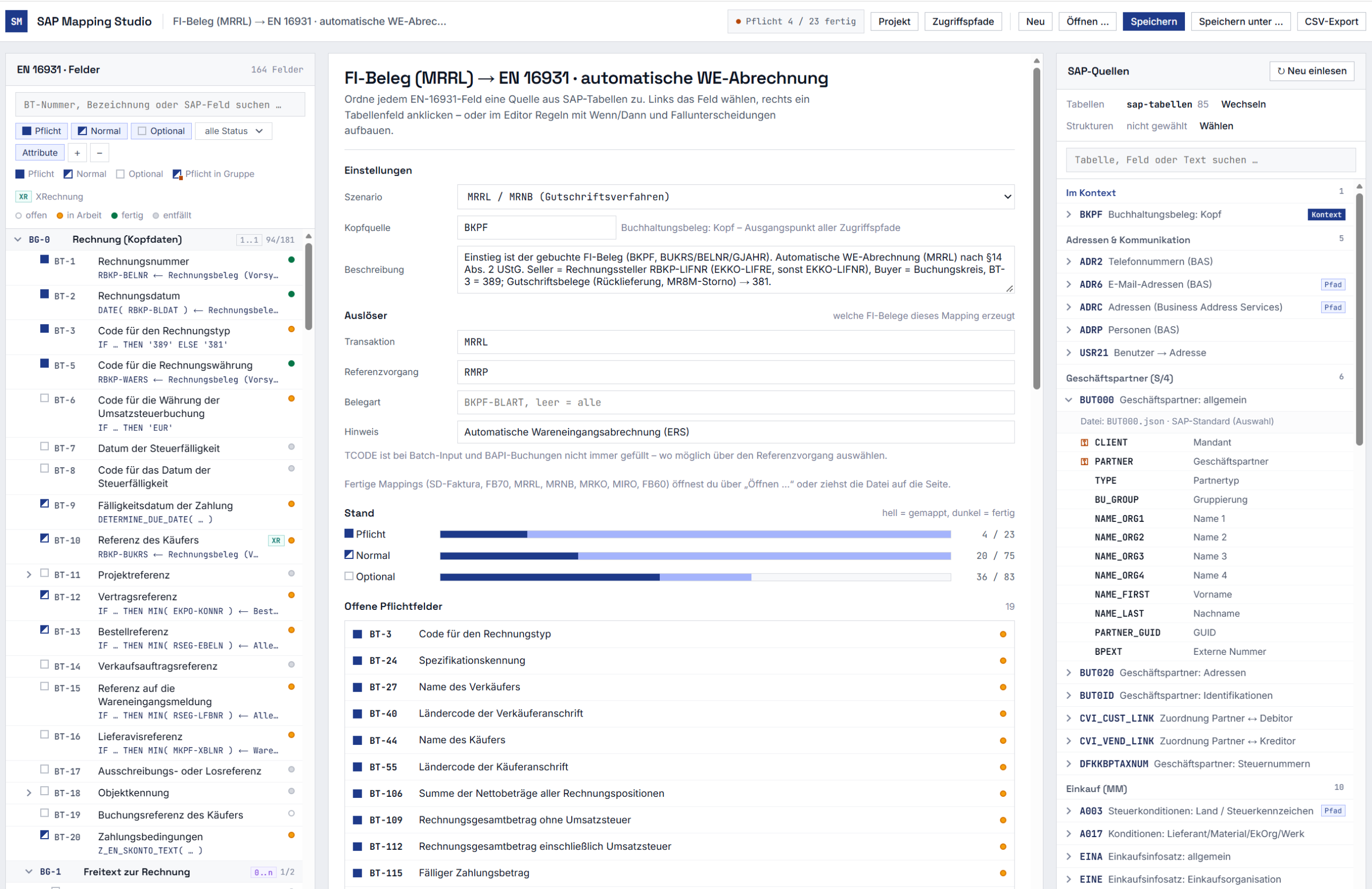
A mapping is not a text document that someone types up, but a workspace with three columns. The status can be read at any time: how many mandatory fields are filled and which are still open.

A mapping at a glance. On the left the field catalogue with status per BT number, in the middle scenario, header source and trigger, i.e. which documents this mapping creates at all, on the right the imported SAP tables. At the bottom the open mandatory fields: a work list, not an error message.

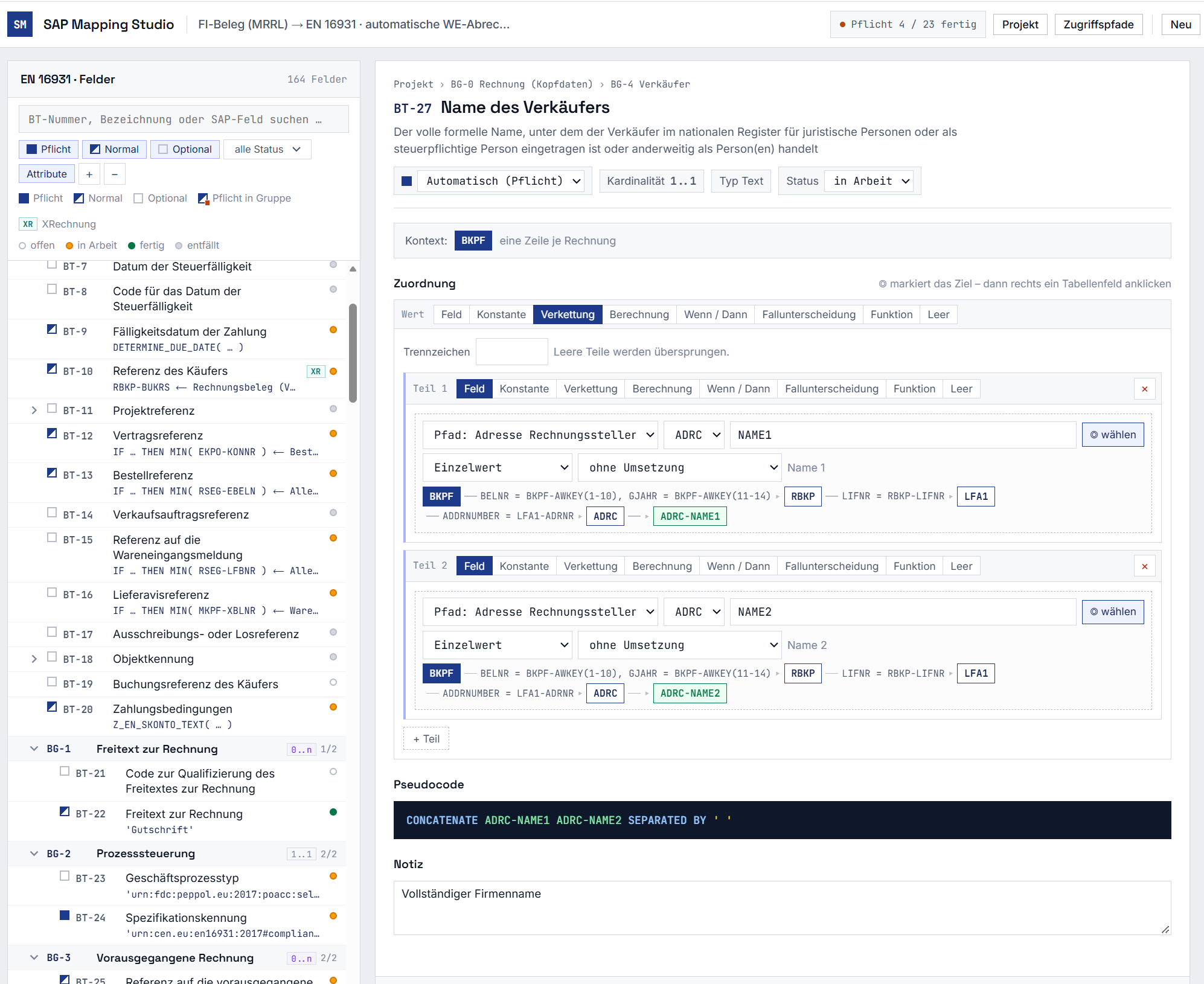
A field in detail. BT-27, the seller’s name, is built here from ADRC-NAME1 and ADRC-NAME2, concatenated with a space. Each part shows the complete access path from BKPF via RBKP and LFA1 to ADRC. The pseudocode below it is what is actually executed in the end, readable before anything is generated.


Four source types

Table, structure, text, document

Table

The normal case: a read access with the conditions of the access path, resolved at runtime.

Structure

The data comes from a function module, for example the SD billing output. Internal tables of the structure are joined via the keys, exactly as the paths describe.

Text

Long texts from MM and SD as well as standard texts. The mapping names text object, text ID, text name and language; the name is often a pattern made of document fields.

Document

Archive documents with object, document type and selection when there are several hits, as an attachment in the XML or as an enclosure in the PDF, with limits for size and number.

What you gain: All four source types are described declaratively, and none of them forces customer-specific code.


More than mapping fields

What a mapping can express

  • Conditions in the access paths

    Equal, not equal, empty, not empty, in a list, by pattern, greater and less than, for example to choose the language in text tables or to hide statistical items.

  • Document variables

    Values that are determined once per document and reused everywhere. The most important example is the recipient’s language: from the billing document, otherwise from the master record, otherwise German.

  • Rules instead of code

    Field, constant, concatenation, calculation, if/then, case distinction, value mapping and functions. The pseudocode under each field is what is executed in the end.

  • Value mapping

    A rule looks up an SAP value in a value table: the payment method for the payment means, sales document category, billing category and billing type for the invoice type, the tax code for the tax category. The tables are maintained on the processing server without touching the mapping.

  • Condition control

    Which conditions go into the price, which appear as a charge or allowance, whether an item shows only its total and how sub-items are handled is set in value tables per sales organisation, billing type and pricing procedure.

  • Identifiers with scheme

    The attributes of the standard, such as the scheme of a GLN or a Peppol identifier, are separate fields too and are mapped like any other.

How the tables of a mapping are connected is shown in the mapping diagram; the mapping list provides the same mapping as a list for reference. More on the tables on the server can be found under Value tables and conditions.


Custom fields

Extend your Z fields instead of replacing

Custom fields in standard tables are the norm in projects. Technically they are in append structures; from a business point of view they belong to the same table.

Replace completely

The table is exported completely. Disadvantage: several hundred fields in the selection list, the selection tailored to the e-invoice is lost, and updates to the library overwrite it.

Extend, recommended

A second file for the same table contains only the additional fields. When loading, they are laid over the base definition and marked as custom. The base library remains updatable.

What you gain: no user exit, no transport, no developer authorisation. An additional source is customizing, not a development task.


Try it yourself

The demo, right here on the page

The demo has the table library and two ready-made mappings built in: SD billing is loaded, FB70 you select at the top via “Load example”. Click a field on the left and see in the middle where its value comes from. Everything stays in your browser; “Save” downloads the mapping file.

.sp-demo-narrow{display:none}@media (max-width:1099px){.sp-demo-wide{display:none}.sp-demo-narrow{display:block}}

The studio shows three columns side by side and therefore needs a wide screen.

Open in a separate window →


Manual

SAP Mapping Studio in detail

SAP Mapping Studio manual

All functions of the Mapping Studio: mapping tables and fields, BT fields, conditions, export.


What does this look like in your system?

Your Z tables and Z fields are not a special case but the normal case. Show me a document type, and I will show you the mapping for it.