
How it works

E-invoices from SAP in two stages: SAP reads, your server calculates

Here you see how a posted document in SAP ECC or S/4HANA becomes a validated e-invoice, and why the approach is built this way. The work is split into two stages, and both run in your company: the add-on in SAP and a processing server in your network.

At a glance

Three basic ideas carry everything else. The posted accounting document is the common anchor, whatever module it comes from. A mapping file tells SAP what to read and the server what to calculate from it. And for every piece of information: what is in the document takes precedence.

Who does what: SAP decides and reads, the server translates and calculates

The dividing line between the stages follows a simple question: does a rule control, or does it translate? What controls lives in SAP, because your team maintains and transports it there. What translates and calculates lives on the server, because it changes with every new format version.

Tasks of the two stages
Stage 1: SAPStage 2: processing server
Taskdecide which document is processed, which mapping applies and who the invoice goes to; read the datatranslate SAP values into fields of the standard, calculate, generate the format, validate, deliver
Rulesassignment of mappings, output defaults, deviating partners, choice of bank details, exceptionsrule part of the mapping, value tables, handling of conditions, code lists of the standard
Maintained withSM30 in SAP, partner data directly in the production systemthe tools at the workstation, release on the server
Changes whenSAP changesa new format version or a new rule version arrives

What you gain: A switch from XRechnung 3 to 4 does not touch your SAP. And the business logic is not maintained twice, because the mapping serves both stages.


The path of a document from posting to the archive

  • 1. Post

    A document is posted, for example a billing document with VF01, a credit memo with MRRL or an invoice with FB70. A record is created in table BKPF.

  • 2. Find

    A background job reads BKPF by entry time and puts new documents into a queue. This depends on the table, not on the posting route; dialog, batch input, BAPI and IDoc behave the same.

  • 3. Assign

    The add-on determines company code, organisation, document type and partner, selects the matching mapping and assembles the recipient profile. If the document is excluded, the path ends here with a reason.

  • 4. Read

    The add-on reads exactly the fields the mapping names, plus texts and documents from the archive, and sends them as XML to your server.

  • 5. Generate and validate

    The server translates the values, generates XRechnung, ZUGFeRD or Peppol BIS and validates the invoice with the official KoSIT validator. If it fails validation, it does not go out.

  • 6. Deliver

    With Peppol the server hands the invoice to your provider’s access point. With e-mail, SAP sends it via SAPconnect, with the XML and, if set in the profile, the PDF.

  • 7. Store

    XML, PDF and validation report come back to SAP and are attached to the accounting document via ArchiveLink. Only then does the server delete its copy.


Six decisions that determine everything else

The posted document is the anchor

Every process is based on a record in BKPF. From there the mapping reaches the billing document, the invoice verification or the settlement. One entry point instead of a special route per module.

A job instead of an event

The posting events in SAP are triggered before the document number is assigned or are missing in some modules. The delta run over BKPF, on the other hand, finds every posted document, even if it came in via an interface.

Exclusion instead of permission

Because the e-invoice is mandatory, there is only a list of exceptions, each with a reason and validity. No posted document silently slips through.

Interpreter instead of code generator

The add-on evaluates the mapping at runtime and generates no program code. A new mapping therefore needs no transport of programs.

The document leads

The same order of precedence applies to every piece of information: what is in the document, then what is maintained differently for the partner, then the default, then the rule in the mapping. If a mandatory value is missing, nothing is guessed.

ArchiveLink is a prerequisite

XML, PDF and validation report must be stored unalterably with the document, and attachments such as delivery notes come from the archive. Without an archive, neither can be solved cleanly.


One mapping, two readers, and value tables for everything that is translated

The mapping file contains two kinds of statements. Where is the data? These are access paths, repetitions and key conditions, and they are read by the add-on in SAP. What does it become? These are rules such as if/then and case distinctions, and the server calculates them. Another Z table of the customer is therefore a change to the mapping, not a programming task.

What is translated the same way in many mappings is kept in value tables on the server: which billing type results in which invoice type, which payment method in which payment means, which tax code in which tax category, and how conditions appear on the invoice. Every mapping calls them by name, and they are maintained once.


Only the fields the mapping touches

Raw records in SAP format leave SAP: the date as 20261024, amounts with debit/credit indicator, numbers with leading zeros. There are no BT numbers and no invented fields in SAP. Only the fields the mapping uses are read. That keeps the transfer small, and the mapping file shows completely which data leaves your SAP system.

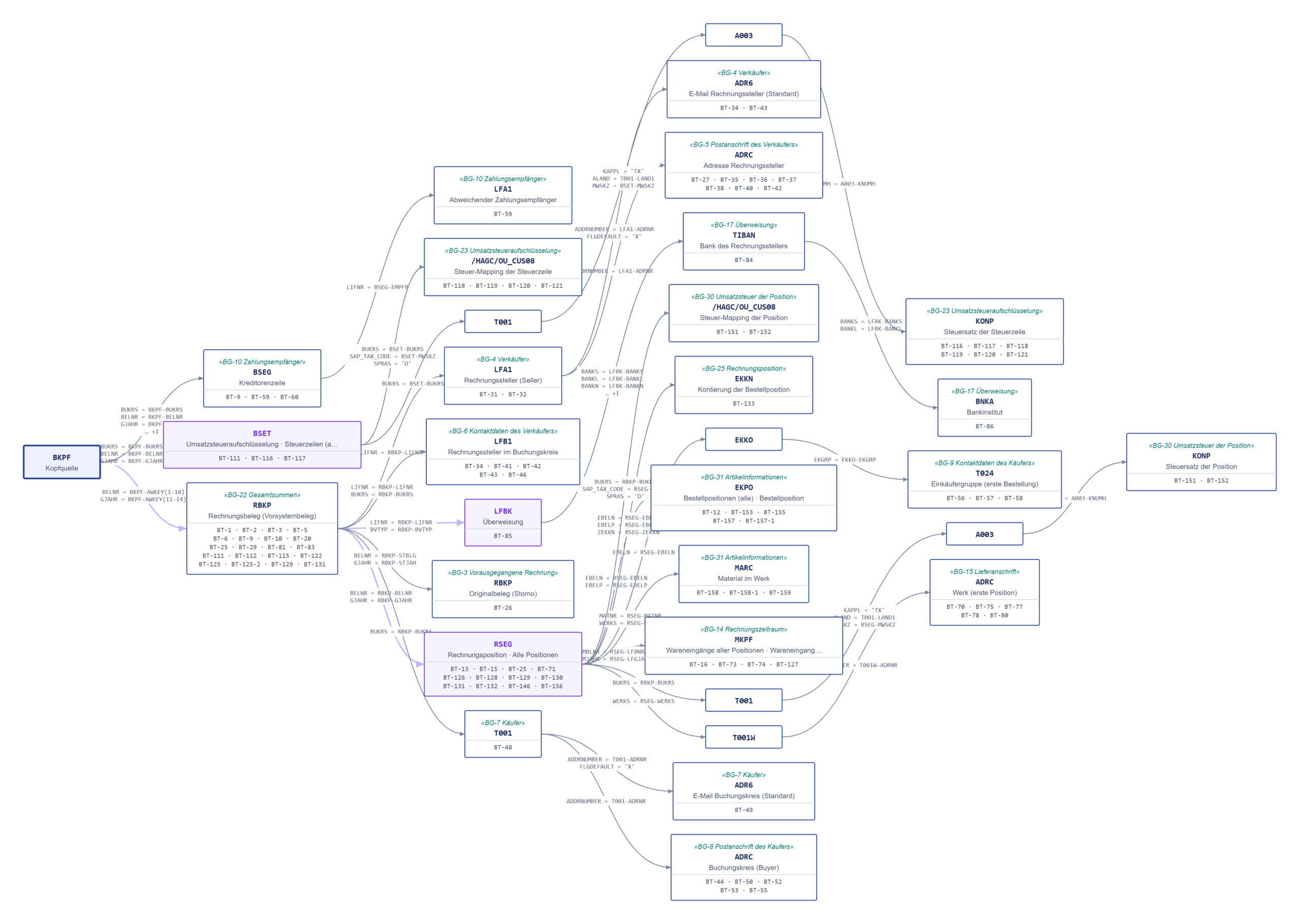
Self-billing (MRRL) as a diagram. The starting point is the posted accounting document. Each line shows which fields connect two tables; each box shows which invoice fields it fills (BT numbers according to EN 16931).


What leaves your company, and what does not

Data flows to the outside
WhatGoes outside?Where to
Document data from SAP: addresses, bank details, texts, attachmentsnoonly to your own server
The finished, validated invoiceyesto the recipient, via Peppol through your provider or by e-mail
Queries for online validation of identifiersonly if switched onpublic services such as VIES
Rule versions and code listsno, they come infrom the supplier to your server
A diagnostic package in case of erroronly if you pass it onto support, with placeholders instead of names and bank details

Questions and answers

Frequently asked questions

Because invoice formats and validation rules change every year, but SAP releases do not. The official KoSIT validation tool is also a Java program. What changes constantly therefore lives on the server, and the add-on stays small and stable.

So that no invoice record leaves your company. The server sits in your network, and you decide whether it runs on your own hardware, in a virtual machine or in your SAP BTP account.

Then nothing is guessed. The server reports a finding, the document stays in the cockpit with the status error, and after the correction you send it again.

Yes. Custom tables and fields enter the Mapping Studio library via the ABAP export and are assigned there like standard tables. The add-on reads them without any code being written.

Every document records the mapping version, the value tables used with their version and the rule version of the validation. Released versions are never changed, only superseded.


What does this look like in your system?

Tell me your document types and your recipient groups, and I will show you which mappings fit and what needs to run on your server.