
Stage 1 · open source · SAP ECC from 7.4 and S/4HANA

The SAP add-on for e-invoicing: reads what the mapping names, and never becomes customer-specific

The add-on is the part of the approach that runs in your SAP system. It finds every posted document, selects the matching mapping and the recipient, reads exactly the data the mapping names and sends it to your processing server. What comes back is stored with the document via ArchiveLink, and in the cockpit you see for every document what has happened.

At a glance

Three things make it special. It is published as open source under Apache 2.0 and costs nothing. It needs no modification and no user exit, not even for your own Z tables. And it runs on SAP ECC from release 7.4 as well as on SAP S/4HANA in your own data centre or in the Private Cloud.
Custom e-invoice programs in SAP become outdated every year

Anyone who builds e-invoicing in ABAP themselves builds it anew for every document type: once for billing, once for self-billing, once for the FI invoice. Every program contains the same rules for tax category, invoice type and payment means, and every new format version has to be applied to all of them.

The add-on turns this around. It is an interpreter: it reads the mapping file at runtime and generates no program code. The business logic lives in the mapping and on the server, not in ABAP. That is why the add-on only changes when SAP changes, not when a new format version appears.


What the add-on does with every document

  • Find new documents

    A background job reads BKPF by entry time, with an overlap window against late-visible postings, and puts new documents into the queue without duplicates.

  • Determine mapping and recipient

    From company code, organisation, transaction, document type and partner it determines the matching mapping and the recipient profile. The most specific entry wins.

  • Check exceptions

    If the document, the partner or the document type is on the exception list, the path ends here, with reason and validity.

  • Read what the mapping names

    Tables, texts and archive documents, collected for all items at once instead of line by line. Only tables listed in an approved mapping are read.

  • Hand over to the server

    The raw data goes as XML via an HTTP connection from SM59 to your processing server. The add-on identifies itself with a certificate.

  • Store and send

    XML, PDF and validation report come back and are stored with the document via ArchiveLink. For the e-mail channel the add-on sends the invoice via SAPconnect.


Eleven tables in SAP, and only ones that control

The add-on brings eleven tables of its own. Translation tables are not among them; which billing type results in which invoice type is kept in value tables on the server. What stays in SAP is what controls: which mapping applies, to whom and how the invoice goes, and what has happened to every document.

AreaTablesMaintained
Mapping and selectionmapping versions, assignment of mappings, exceptionsassignment as customizing with transport, exceptions directly in the production system
Process and logqueue, immutable history, delta marker, connection to the serverby the add-on itself, the connection once during setup
Recipient and senderoutput defaults, deviating partners, sender data per company codedefaults as customizing, deviating partners directly in the production system
Identifier checkresults with time and query numberby the add-on itself; must not be reorganised

What you gain: Accounts receivable enters a new Leitweg-ID or a deviating mail recipient themselves, without waiting for a transport. Whatever changes the behaviour for all documents, on the other hand, takes the usual route through your development system.


The cockpit: one line per document, and below it, why

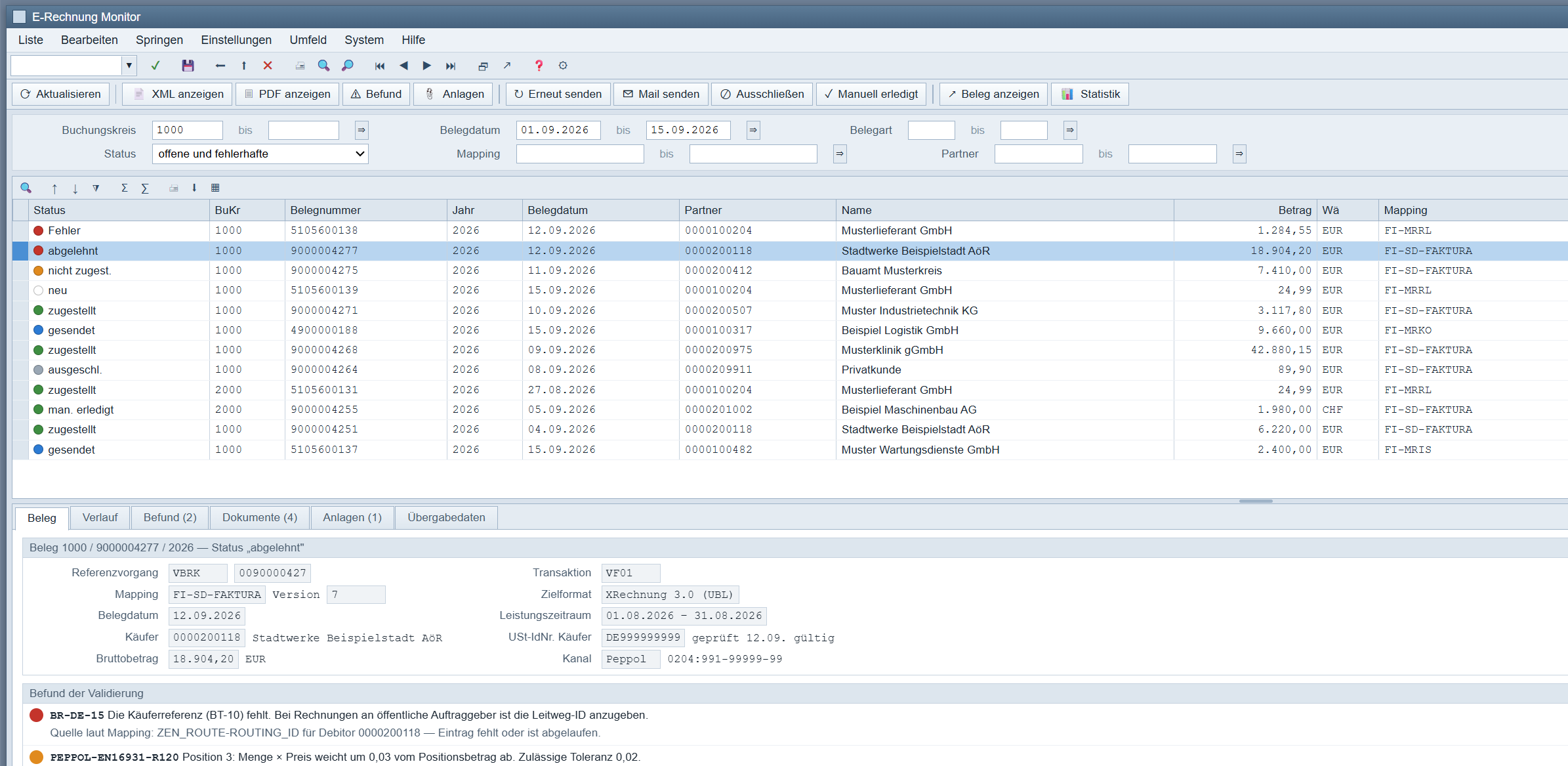
The cockpit in SAP GUI. At the top the selection by company code, document date, status, mapping and partner. The list shows for each document what has happened, with amount and mapping used. At the bottom the selected document with history, finding, documents and attachments. The finding is in plain language: here the Leitweg-ID for a public-sector customer is missing, and the source according to the mapping is named right away.

For each document you display XML and PDF from the archive, read the finding with field and rule version, resend after a correction, exclude it with a reason or set it to “handled manually”. Each of these functions is a method of a separate service layer; the report itself contains no logic. A job also sends the error list by e-mail, so that errors are noticed even when nobody opens the cockpit.


What makes the add-on special

Mail templates in SO10, sending via SAPconnect

Subject and text of the e-mail are SO10 standard texts, in as many languages as you need. Placeholders such as &BT-1& for the invoice number work for every document type. Sending is done via SAPconnect and monitored in SOST. The XML is always attached, the PDF depending on the setting.

What you gain: Your team maintains mail texts the way it has always maintained form texts, without a new interface.

The right bank details, without account data in customizing

If the document contains a house bank, it applies. Otherwise the house bank at the partner applies, otherwise the default per company code and sales or purchasing organisation. Only the keys from FI12 are entered; the add-on reads IBAN and BIC from the bank data in SAP. In self-billing it is the supplier’s bank details.

What you gain: If an account changes, you only maintain it in FI12.

Enclosure in the PDF or attachment in the XML

Delivery notes or time sheets from the archive are added either as an enclosure to the PDF or as an attachment in the invoice. The add-on checks size and file type before sending.

What you gain: An oversized scan does not make an invoice undeliverable only to be noticed at the end of the chain.

Custom tables without user exits

Your Z tables and Z fields enter the Mapping Studio library and are assigned there like standard tables. The add-on reads them because they are in the mapping, not because someone has written code.

What you gain: Your company’s special requirements remain customizing.


ABAP for ECC 7.4 and S/4HANA, checked before it sees a system

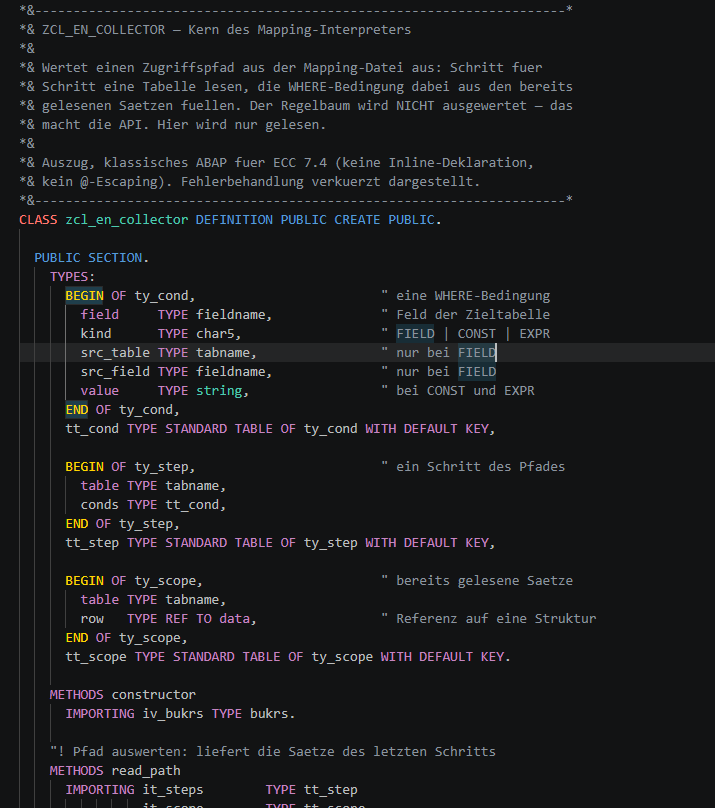
Excerpt from the interpreter. Classic ABAP within the language scope of 7.40, without inline declarations, so that the same code runs on ECC and S/4HANA. The class evaluates an access path from the mapping file: reading a table step by step and filling the condition from the records already read. The server calculates the rule part; that is why a switch to XRechnung 4 changes nothing in this component.

The add-on is an abapGit repository with its own prefix and a clear package structure. A checking tool tests every version against the 7.40 language scope before it is delivered. Installation is via abapGit or as a transport.


11

tables are brought along by the add-on; none of them changes the SAP standard.

4

source types are known to the mapping: table, structure, text and archive document.

0

user exits are needed for custom Z tables and Z fields.

8

states are known to every document; three of them are an end point, the rest are work in progress.


What your system needs

  • SAP ECC 7.4 or higher, or SAP S/4HANA on-premise or Private Cloud. The mappings know both table worlds, for example the conditions in KONV and in PRCD_ELEMENTS. S/4HANA Public Cloud is not possible, because it allows neither custom tables nor free reading.
  • ArchiveLink with a connected content repository; the SAP Content Server is sufficient.
  • An HTTP connection to your processing server, set up in SM59, certificates in STRUST.
  • SAPconnect for sending e-mail.
  • Background processing for the delta run and the status reconciliation.

Questions and answers

Frequently asked questions

Yes, under the Apache 2.0 licence. Publication is currently being prepared. You may use, modify and redistribute the add-on.

No. abapGit is the easiest way; if you do not allow it, you get the add-on as a transport.

They are not part of the process. A billing document that has not been passed to accounting is not a completed business transaction and therefore does not create an e-invoice.

Yes, as a supplier of the transfer XML with the raw data, which you process further yourself; the format is openly documented. Validation, the finished invoice and the delivery status in the cockpit require the processing server.

The add-on only reads tables that are listed in an approved mapping version. Values in conditions are checked and escaped. A mapping with an unknown source is rejected as soon as it is uploaded.


What does this look like in your system?

I am happy to show you, using a document type from your company, what the add-on reads and what it hands over to your server.